
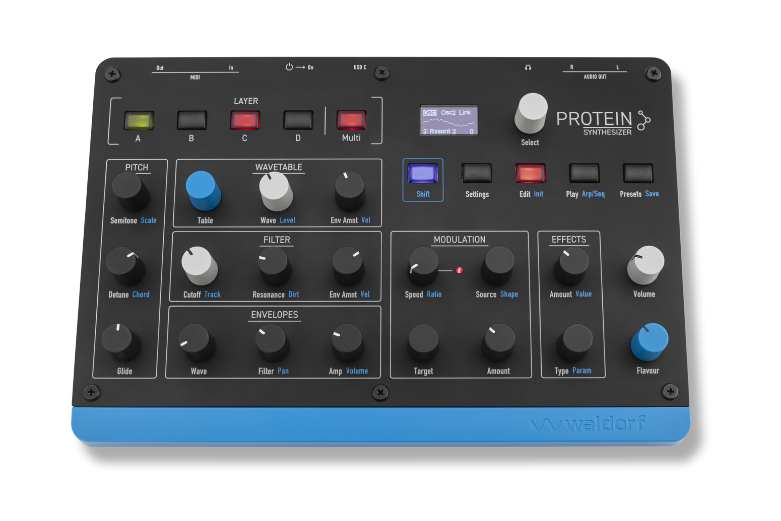
At the end of the FAQ list you will find the download links for this product.
You can find available updates in your “myWaldorf” account under Hardware OS updates/Protein.
– Make sure Protein is switched off.
– Connect to a computer via USB.
– Hold SHIFT button while switching on Protein.
– On the display the bootloader will welcome you.
– On your computer Protein will appear in your file manager like Finder or Explorer as an external drive.
– Copy the PROTEIN.UF2 you can find in your “my waldorf” account under “Hardware OS Updates & Files”
– You might be asked by your file manager if you like to overwrite the existing file. Just answer yes.
– After a few seconds the display report that the update is done.
– Then power cycle Protein and you are all done.
Some notes:
– If you like to determine which version you have installed, just press SHIFT + Settings.
– You can always downgrade to a previous version if needed.
This device has unbalanced outputs. We recommend using it with unbalanced cables.
New OS versions are available in your “my waldorf” account under Hardware & OS Updates.
Here is the changelog:
https://downloads.waldorfmusic.com/cloud/index.php/s/FwQP632ba84cDLx
You have to import the presets via the “Preset Action” menu. Press the Select encoder to open a pop-up menu in the display. Here, you can select the desired options and confirm by pressing on the Select encoder:
Start Receive: Puts Protein in a receive mode for multiple sound presets as MIDI SysEx dump from any external MIDI source. Here, you can set the slot from which onwards received presets will be stored. No existing presets will be overwritten but instead the next empty slot chosen. You must either confirm or cancel the final start of the process.
For macOS, there’s a handy free tool called “Sysexlibrarian” that you can use. For Windows, there’s “MIDI-OX,” which is also free. In the download section, you’ll find “Sysex-Drop,” which you can also use to send Sysex data to the Protein. The delay between packets should be set to at least 150 ms. Sysex-Drop is available for both Mac and Windows.
Warning! Restoring the factory sounds will delete all existing presets on your Protein. It’s best to back up your user presets beforehand by recording them as a MIDI dump using a suitable program (MIDI OX for Windows, or Sysex-Librarian for macOS). The Send/Send Range function is located in the Presets/Actions menu.
How to proceed: While powering on, press and hold the three encoders (Target, Source, and Type) on the right side for a few seconds. You’ll then find the “Load Factory” function at the very bottom of the Actions menu.
No, this device only sends and receives MIDI via USB. Transferring audio via USB isn’t possible.
First, make sure you’ve tried all the procedures above that are related to your issue.
If nothing helps and your device is still covered by warranty, please contact the retailer where this device has been bought.
All our devices come with 2 years of warranty. Depending on local law, some retailers only cover 1 year of warranty service. If your device has been bought more than one but less than two years ago, and your dealer refuses to do a warranty service repair, please contact the distributor for your area. You will find a list of them here: https://waldorfmusic.com/en/international-distributors
If your device is out of warranty, please, use the button in the upper right corner. Please, give a precise description of the error. If it’s really necessary to send in your unit, we will issue an RMA form.
Wrap up your device safely. Ensure that it’s padded at least 5cm/2inches in ALL directions all around. Use a sturdy cardboard box and parcel tape. Do not use gaffers tape as this often becomes detached during transport. You are responsible for transport damages that result in improper wrapping. Best if you use the original padding and box, then wrap up the device as it was when you received it.
Fill out the RMA form on your computer. Print it out, sign it and put it INSIDE the box. We reserve the right to refuse working on devices which come with no error description.
IMPORTANT: When sending in your device from outside the EU
All packages must have a proforma invoice stuck on the OUTSIDE of the box. This is important for the customs duty. The contents of the parcel must be named and described exactly on the invoice, with declaration of the date of purchase and condition of the unit.
We would recommend to describe your device as defective and mark the contents of the parcel at a total value of 25€ or less. Otherwise, there will be extra fees (tax) from customs duties which we must pass onto you. No tax will be charged for goods with a value less than 25 €. Keep in mind that in case the parcel gets lost, the insurance of the post service (if applicable) will only refund the value marked in the declaration.
If the above points are not considered, please be aware that we must charge you the extra costs which arise through customs duty for storage and the additional handling etc. This would be an amount between 60 – 100 Euro.
